"How have you been feeling?" is one of the first questions in any GLP-1 follow-up, and one of the hardest to answer well on the spot. The bad days are vivid, the good ones blur, and two weeks ago might as well be two months.
A side effect journal fixes that, as long as it's light enough to keep. This guide shows a way to log how you feel in a few seconds a day, arranged so that patterns show up without you hunting for them. It isn't about deciding what a symptom means, which is your prescriber's job; it's about giving them, and you, an accurate picture.
What to log, and what to leave to your care team
Your medicine's label lists the side effects that were reported in its studies. That list is a good place to start when you set up a journal, because it gives you words for what you might notice. Hushweek's own list is one short list for every medicine, stomach symptoms first, and you can add one in your own words. If you follow a US label, the app's Learn from your label page also lists that label's most common side effects.
The journal's job is to record what you noticed, how strong it felt, and when. It isn't the place to work out a cause or a fix. If something is severe, new, or worrying, don't wait for your next appointment: contact your prescriber, pharmacist or local urgent care. Your label also describes when to get help.
A simple scale
Keep the rating simple so it's quick and consistent. Four levels are enough:
- None — nothing noted today
- Mild — noticeable, but it didn't change your day
- Moderate — it changed some of what you did
- Severe — it was hard to get on with your day
Fancier scales tempt you to agonize over the difference between a 6 and a 7. Four words are easier to choose between at the end of a long day. Hushweek uses the same words: one tap marks a side effect mild, a second moderate, a third severe, and a fourth clears it.
Arrange it by day since your dose
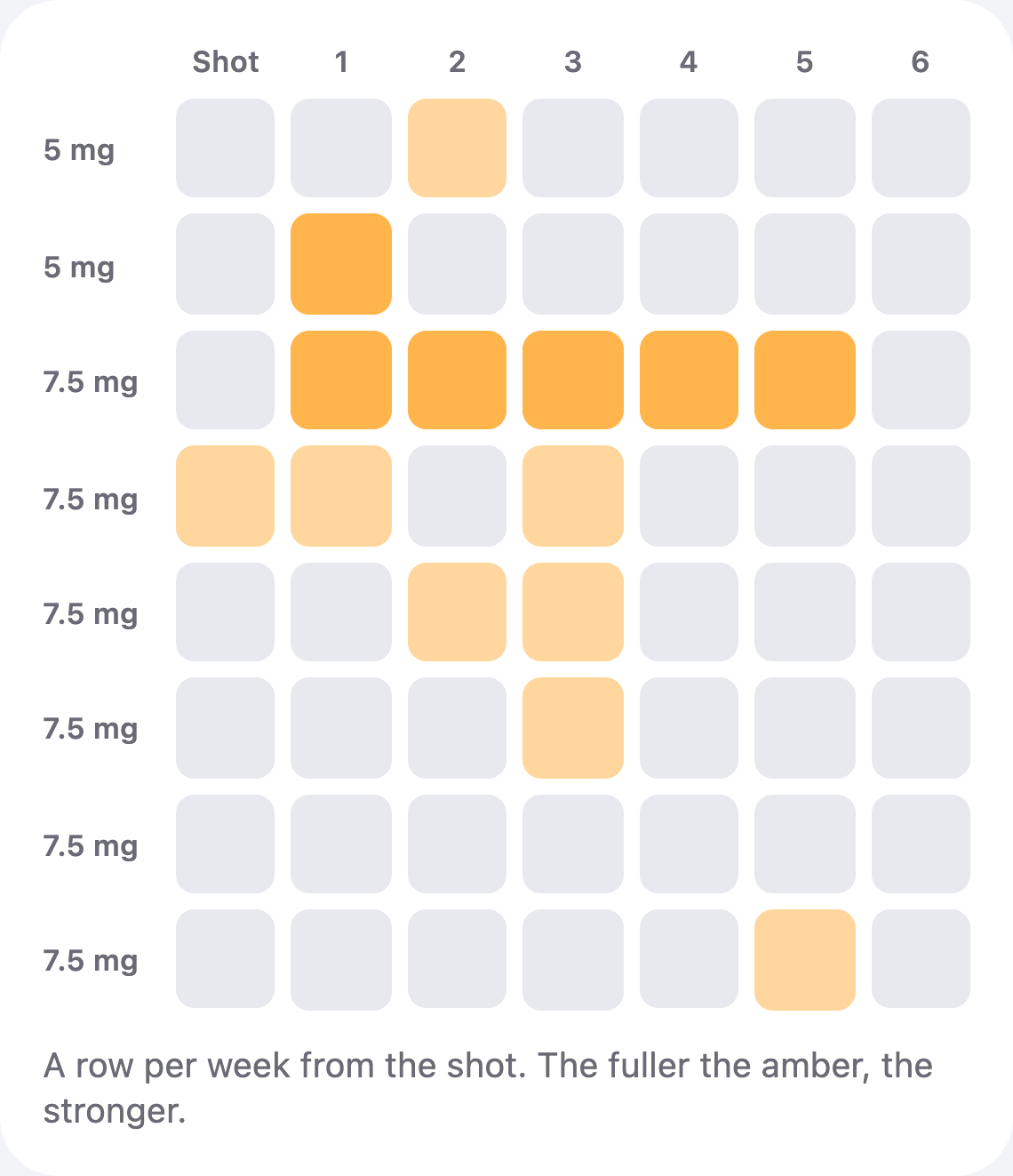
Here's the trick that makes a journal readable. Most people write entries by date. On a weekly medicine, it's much more useful to line them up by day since the dose: the dose day, the day after, two days after, and so on. Put each week on its own row and the columns line up.
Busiest column: 2 days after the dose. 30 of 42 days clear.
Laid out like this, your own pattern (whatever it turns out to be) becomes visible at a glance. Maybe one column is consistently busier. Maybe things are scattered with no rhythm at all. Either way, that's a far clearer thing to show your prescriber than a list of dates. Hushweek draws this grid from the side effects you log: its Side effects page shows your last eight doses, a row each, with the amber deepening as a day gets stronger.
Add a little context
A few extra details make the journal far more useful in an appointment, and each takes a second:
- Dose changes. Note the week a dose changed, as your prescriber set it. Your injection log may already hold this, and in Hushweek a dose logged with the wrong day or strength can be corrected from History, so each row starts on the right day.
- Anything else that changed. A new routine, travel, illness, a different time of day for your dose.
- What you did, if anything. "Rested", "called the pharmacist". Facts, not judgments.
- A short free-text note on days that need one. Most days won't.
Keep it to a few seconds a day
The journals that last are the ones that ask very little. A check-in at the same time each evening, a tap for each thing you noticed and its strength, and you're done. If nothing happened, that's worth recording too, because empty days are part of the pattern. In Hushweek there's nothing to tap for those: a day with no side effect logged stays an empty square on the grid.
A clear row of "nothing noted" is as useful to your prescriber as a busy one.
Bring it to your appointment
When you see your prescriber, nurse or pharmacist, a grid and a short list of notes is much easier to talk through than a memory. Our appointment checklist covers what else to bring. Hushweek's doctor report brings your doses, weight, side effects and check-ins together in one PDF you can share. Your first report is free, every one after it comes with Hushweek Pro, and the CSV export is always free.
If appetite and "food noise" are things you'd like to track too, keep them as separate check-ins. We cover that in our guide to logging food noise.
Questions people ask
How do I track side effects on a GLP-1 medicine?
Log what you noticed, how strong it felt on a simple four-level scale, and the day. Arranging entries by day since your dose, one week per row, makes your own pattern easy to see.
Which side effects should I look out for?
Your medicine's label lists the side effects reported in its studies, and your prescriber can tell you what matters in your case. If something is severe, new or worrying, contact them or urgent care rather than waiting.
Is a symptom diary useful for my doctor?
Yes. Dates, strength and context are much more reliable than memory, and a grid by day since the dose is quick to read in an appointment.
Does Hushweek tell me what a side effect means?
No. It records what you log and lays it out clearly. Interpreting it is for you and your care team.
Keep your week in one quiet place.
Doses, sites, weight, side effects and food in a free app that follows your medicine’s own label. No account needed.
Get Hushweek